Peacock TV: Stream TV & Movies
- 4.5
- Rating
- 50.00M
- Installs
- Free
- Price

 Analysis by App-foxy
I use streaming apps differently depending on the day. Sometimes I want a familiar television series without planning an evening around it; sometimes I want a film, a live sports event, or something light to play in the background. Peacock TV: Stream TV & Movies is built for that mixed routine rather than for one narrow type of viewer. It is a free entertainment app from Peacock TV LLC, with optional in-app purchases ranging from $7.99 to $169.99 per item, and its main appeal is bringing live sports, movies, current television, and other programming into one place.
That broad approach is also the reason I would not recommend it automatically to everyone. The app can be useful when its particular catalog matches what you want to watch, but a large library is not the same as a perfect library. I found the experience most convincing when I treated Peacock as a focused part of my streaming setup, not as a guaranteed replacement for every other service.
How Peacock TV feels in everyday use
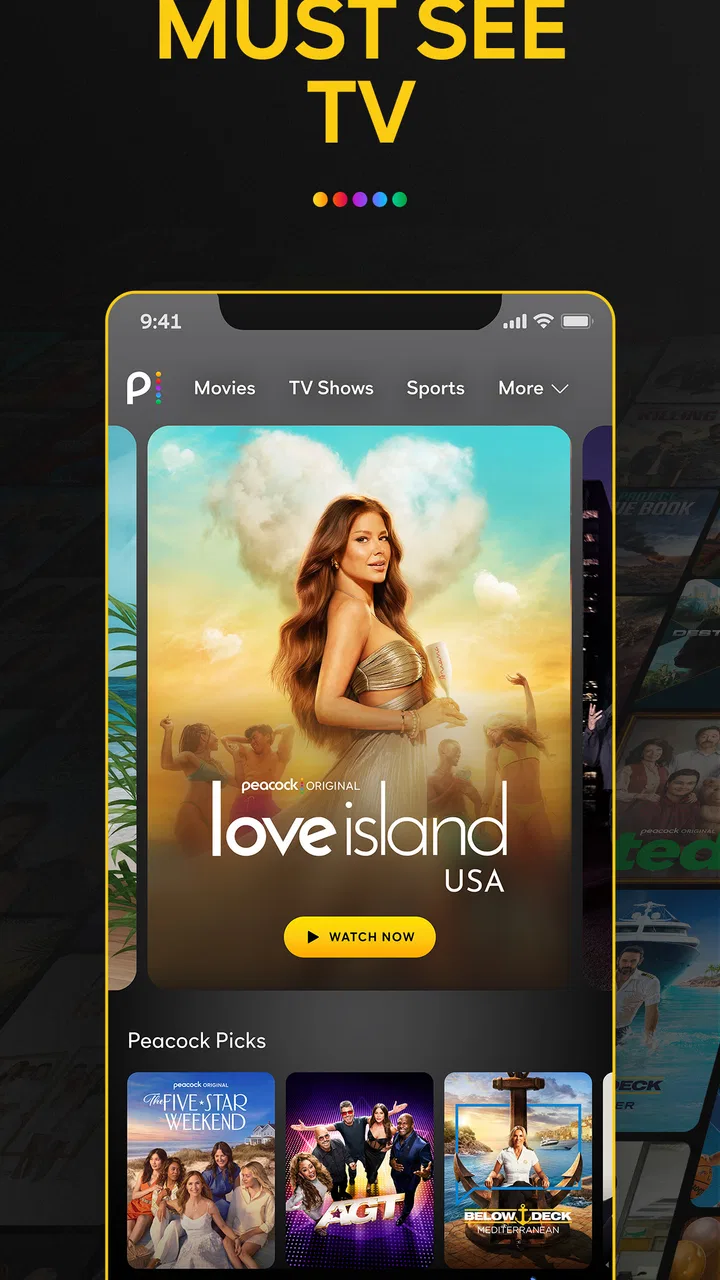
The first thing I noticed is that Peacock is designed around browsing as much as searching. Its home experience encourages you to move between television, movies, sports, and other entertainment instead of opening directly into one long list. That suits me when I have a vague idea of what I want, such as “something short” or “a film for tonight,” but it can feel less efficient when I already know the exact title.
You May Also Like

 Blood Strike: 2.5 Anniversary
Blood Strike’s Loadouts Turn Every Drop Into a Tactical Gamble
A close look at Blood Strike’s custom loadouts: how fast access to signature weapons reshapes its battle royale rhythm, rewards preparation, and narrows the gap between fights.

 Pandora - Music & Podcasts
Pandora’s Music Is Easy to Start, but Harder to Recover
Pandora’s strength is its low-effort path from a seed to a station. Its weak spot is how much confidence it asks you to place in connection, setup, and quiet recovery.

 8 Ball Pool
 Is Built on Rivalries, Rematches, and Routine
A close look at the rivalries, rematches, shared routines, and unanswered safety questions that turn a quick pool match into a persistent mobile community.

 Samsung Music
’s Quiet Strength Is Playing What You Already Own
Its reach comes less from spectacle than from dependable access to a personal library. That simplicity is both the app’s strongest retention engine and its ceiling.

 AccuWeather: Weather Radar
AccuWeather Review: A Quick, Clear Forecast for Everyday Decisions
For everyday plans, the best forecast is the one you can understand quickly. AccuWeather makes rain timing, radar, and local conditions easy to act on, with a few trade-offs.

 Hill Climb Racing
Why Hill Climb Racing Still Turns Crashes Into One More Run
A tiny car, a bumpy hill and one more upgrade: Hill Climb Racing keeps resurfacing because its simple chaos makes every near-miss feel personal.
More From Our News Desk
View All News


For a realistic example, imagine finishing work and wanting to watch something while eating dinner. I can open the app, look through the current selections, and move between categories without switching services immediately. If a live sports event is available, that changes the purpose of the app again: it becomes a destination for a scheduled moment rather than merely a library I browse whenever I like.
The strongest everyday advantage is variety within one entertainment app. I do not need a separate place for a film, a television episode, and a live event when Peacock has the type of content I am looking for. That convenience matters most for households where different people want different kinds of viewing.
The free entry point is helpful because it lets people try the basic experience before deciding whether optional purchases make sense. Still, “free” should not be read as “everything is available without conditions.” The content mix and access level can affect whether the app feels complete for you, so I would first use it to test the shows, films, and sports that actually matter to your household.
Who will get the most from it
I think Peacock is a good fit for viewers who like switching between established television programming, movies, and sports. It also makes sense for someone who does not want to commit immediately to another paid entertainment service. The Teen content rating gives families a useful starting signal, although parents should still check individual titles rather than assuming every item is suitable for every teenager.
It is especially practical for casual viewers who prefer discovery. If you often say, “I just want to see what is on,” the app’s mixture of sections can make that decision easier. I also see value for sports viewers who want an app that can serve a live event and then remain useful for ordinary television or movie watching afterward.
On the other hand, I would skip it if your entire decision depends on one specific title being available all the time, or if you expect one subscription to replace every service you already use. A specialist sports platform may be better for someone who follows a particular competition obsessively, while a dedicated film service may suit a viewer who rarely watches television or live events.
Finding something quickly instead of endlessly browsing
My practical advice is to decide what kind of session you are starting before opening the app. “I want live sports” is a different task from “I need a film under two hours” or “I want to continue a series.” Moving directly to the relevant area reduces the temptation to scroll through unrelated recommendations.
When I am undecided, I use browsing as a filter rather than treating every visible title as a commitment. I look for a familiar genre or a recognizable cast, then check whether the choice fits the time I have. This sounds simple, but it prevents one common streaming problem: spending longer choosing than watching.
Search is more valuable when you already have a title in mind. Browsing is more valuable when you are open to discovery. Keeping those two habits separate makes the app feel less cluttered, especially on a small phone screen where several content rows can compete for attention.
Watching at home and on the move
Peacock is a natural fit for a living-room television, but a phone or tablet can be more convenient for short sessions. I would use it on a mobile device during a commute only when the viewing situation is stable enough for video, because live programming is less forgiving of interruptions than an episode watched at your own pace.
For a shared home, I would also decide in advance who is using the app and what the viewing priority is. A sports event has a fixed start and finish, while a film can usually wait. That distinction helps avoid frustration when several people are choosing different content from the same entertainment service.
I would not judge the app solely by how attractive the catalog looks on a fast home connection. Your real test should include the places where you actually watch: the television, the phone, and any room with a weaker signal. Streaming comfort depends on the complete routine, not just the first browse through the home screen.
What has changed, what still matters, and where it may go
I’ve found that the most useful way to judge a streaming app is to notice what it adds to the routines I already have, rather than counting how many categories it offers. Here, the key question is whether Peacock earns a regular place on a shared screen while keeping each person’s choices and viewing expectations clear. That also makes it worth considering how the service has matured and which parts of its appeal are likely to remain important.
A product that has had time to settle
Peacock launched on July 13, 2020, so it is no longer a brand-new streaming experiment. That matters because I approach it as an established entertainment product with a defined identity: it combines current television, movies, live sports, and related programming instead of trying to be only a film archive or only a sports tool.
The app’s scale also suggests that it has reached a broad audience. It has more than 50 million installs, an average rating of 4.5 from around 570 thousand ratings, and roughly 78 thousand written reviews. I would not treat those figures as proof that every viewer will have the same experience, but they do show that Peacock has become a familiar option rather than an obscure app.
Its developer, Peacock TV LLC, has kept the service positioned around recognizable entertainment categories. In my view, that is more important than any single visual change: the app’s usefulness comes from how those categories work together. A viewer can arrive for sports and stay for television, or begin with a movie and discover another reason to return.
How the evolution affects existing users
For someone who has used Peacock for a while, the main benefit of this mature position is familiarity. You are not learning an entirely new type of product every time you open it. The broad structure remains understandable: look for the kind of content you want, browse when you are undecided, and use the app as part of a wider viewing routine.
New users should expect a different kind of adjustment. The challenge is not learning a complicated tool; it is learning where your preferred content sits and how much of your viewing can realistically happen inside one service. I recommend spending the first session checking the areas you care about most rather than assuming the first home-screen rows represent the whole experience.
The optional purchase range is another reason to pay attention to your own habits. Some people will be satisfied with the free starting point, while others may consider a paid option worthwhile if it supports the programming they actually watch. I would make that decision after testing the app, not before, because the value depends heavily on whether Peacock’s current selection matches your interests.
Where the app still leaves room for improvement
The broad catalog can create friction. When an app covers movies, television, sports, and live viewing, its interface has to serve several different intentions at once. That can make discovery enjoyable, but it can also make a simple task feel less direct than it would in a narrowly focused service.
There is also a difference between having many categories and having the exact content you want at the exact moment you want it. A viewer who follows one particular team, series, or film collection may find the general variety less valuable than a smaller service with a sharper focus. I would not subscribe purely because the app sounds comprehensive; I would compare it against the programs I actually plan to watch.
Live sports bring their own trade-off. They give Peacock a sense of occasion that an ordinary on-demand library cannot provide, but they also make timing and availability more important. If you mainly watch at irregular hours, on-demand television and movies may be more useful than a live-centered session.
The Teen rating is helpful as a broad guide, but it is not a substitute for checking individual content. Families should make their own choices based on the viewer’s age and sensitivity. I would also avoid handing the app to a younger viewer without first looking at what is currently being promoted on the home screen.
How it compares with familiar alternatives
Compared with a general on-demand streaming service, Peacock stands out when live sports and current television are part of the same routine as movies. A film-focused alternative may offer a more concentrated browsing experience, but it may not serve the same live-event purpose. A sports-first alternative may be stronger for a dedicated fan, yet less useful when the rest of the household wants a comedy or television episode.
Compared with free, ad-supported video platforms, Peacock feels more like a curated television and movie destination. That can make it easier to find recognizable programming, although viewers who enjoy endless creator-driven variety may prefer the looser discovery style of those platforms. The right choice depends on whether you value scheduled, established entertainment or open-ended browsing.
I would also compare Peacock with the services you already pay for before adding another option. If another subscription already covers your favorite shows and sports, Peacock may be redundant. If your current setup lacks live events or a convenient mix of television and movies, it has a clearer role.
Small habits that make the experience better
- Test your priority content first: search for the teams, series, genres, or film types that would justify keeping the app. This gives you a more honest answer than browsing only the featured rows.
- Separate live viewing from casual viewing: plan around live sports when timing matters, then use movies or television for flexible sessions. Treating both modes the same can make the app feel less convenient than it is.
- Use the free access as a trial of your routine: do not evaluate only whether the app opens and plays a video. Check whether it fits the way you choose, start, and finish entertainment on a normal day.
- Keep the household in mind: if several people use the same television, compare the app’s broad selection with everyone’s actual preferences. Variety is valuable only when it includes something each person will watch.
These habits also expose the central trade-off quickly. Peacock is most useful when you want a flexible entertainment hub with live sports in the mix. It is less persuasive when you need a highly specialized catalog or a single service with guaranteed access to every favorite.
What I would watch for before committing
I would pay attention to how often the app gives me a reason to return. One successful movie night is not enough to justify any optional purchase. A better test is whether it serves several different occasions: a live event, a current television episode, a relaxed film, and a quick browse when you have no plan.
I would also watch how the content mix fits the rest of my subscriptions. If Peacock repeatedly sends me to another service for the things I intended to watch, its broad promise has little practical value for me. If it becomes the place I open for more than one kind of entertainment, the free starting point has done its job.
Because the app is free to install, the most sensible approach is low-risk experimentation. Try it during an ordinary week, not just when a major event or popular release makes the service unusually attractive. That reveals whether the app is genuinely useful or merely interesting on a single occasion.
My recommendation after using it
I see Peacock TV: Stream TV & Movies as a flexible companion for people who want television, movies, and live sports in the same entertainment app. Its established presence, broad audience, and accessible free starting point make it easy to try. I particularly like it for households that switch between different kinds of viewing instead of following one narrow category.
My recommendation is more cautious for specialists. If you are committed to one sport, one film style, or one television ecosystem, another service may give you a cleaner and more dependable experience. Peacock can still complement that service, but I would not assume it should replace it.
Overall, I would install it and test my own viewing routine before considering an optional purchase. The app’s real strength is not simply that it contains a lot of entertainment; it is that it can connect several everyday viewing moods in one place. If your ideal evening changes from live sports to a movie or a television episode, Peacock is worth a serious trial. If your needs are highly specific, use it selectively and let your actual watch list—not the size of the catalog—decide whether it belongs on your device.
FAQs for Peacock TV: Stream TV & Movies
01What is Peacock TV and what content does it offer?
Peacock TV is a streaming service that provides a wide range of content, including movies, TV shows, news, sports, and exclusive originals. It features a mix of current hits, classic favorites, and a growing library of original content. Users can also access live TV and on-demand content, making it a versatile option for entertainment.
02Is Peacock TV free to use, or are there any subscription costs?
Peacock TV offers both free and premium subscription options. The free tier includes a selection of content with ads, while the premium plans, Peacock Premium and Peacock Premium Plus, offer more extensive libraries and features, including ad-free viewing and early access to certain episodes. Pricing varies depending on the plan chosen.
03Can I download content from Peacock TV to watch offline?
Yes, Peacock TV allows downloads for offline viewing, but this feature is available only to Peacock Premium Plus subscribers. This means if you have the ad-free plan, you can download select shows and movies to watch later without an internet connection, adding convenience for on-the-go entertainment.
04On which devices can I watch Peacock TV?
Peacock TV is compatible with a wide range of devices, including smartphones, tablets, smart TVs, gaming consoles, and streaming devices like Roku, Amazon Fire TV, and Apple TV. Additionally, it can be accessed via web browsers on computers, offering flexible viewing options for users.
05Does Peacock TV offer parental controls?
Yes, Peacock TV provides parental controls to help manage what children can watch. Parents can create kid profiles with age-appropriate content and set PINs to restrict access to mature content. This feature ensures a safer viewing environment for younger viewers within the household.
Pros
- Wide variety of TV shows and movies.
- User-friendly interface enhances navigation.
- Affordable subscription plans available.
- Offline downloads for premium users.
- Exclusive original content and series.
Cons
- Ads in the free version can be intrusive.
- Limited availability of some live sports.
- No option for simultaneous streaming.
- Regional restrictions on content access.
- Occasional buffering on slower networks.

Peacock TV: Stream TV & Movies
Gallery